Flow Speak
Overview
Flow Speak is an in-development dialogue system for the Unity game engine. This tool is working towards being accessible and sleek, while toting a robust set of features. The development of this tool is still in its early stages, but below you will find an outline for current and future features.
Visual Node-Based Editor
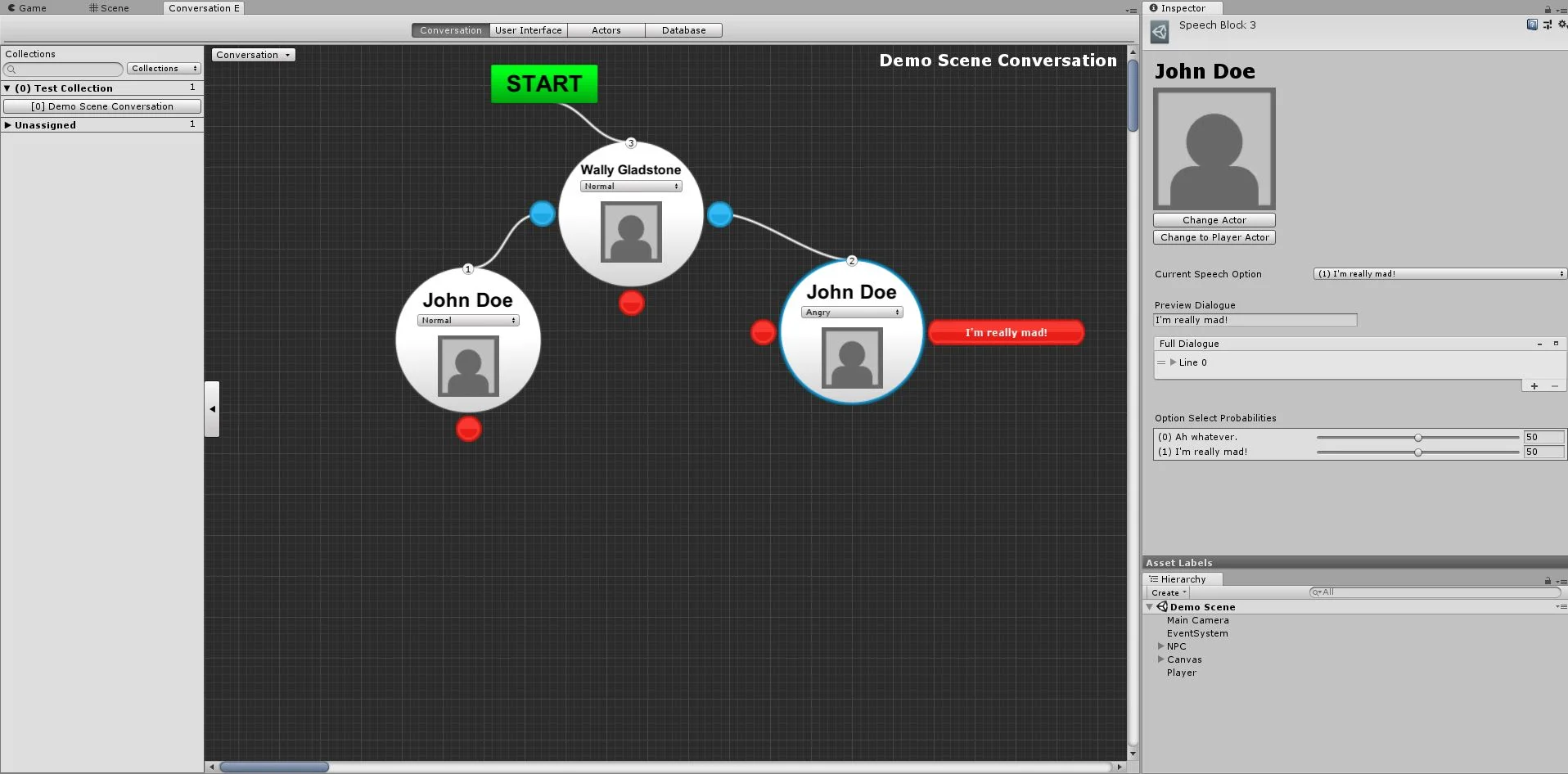
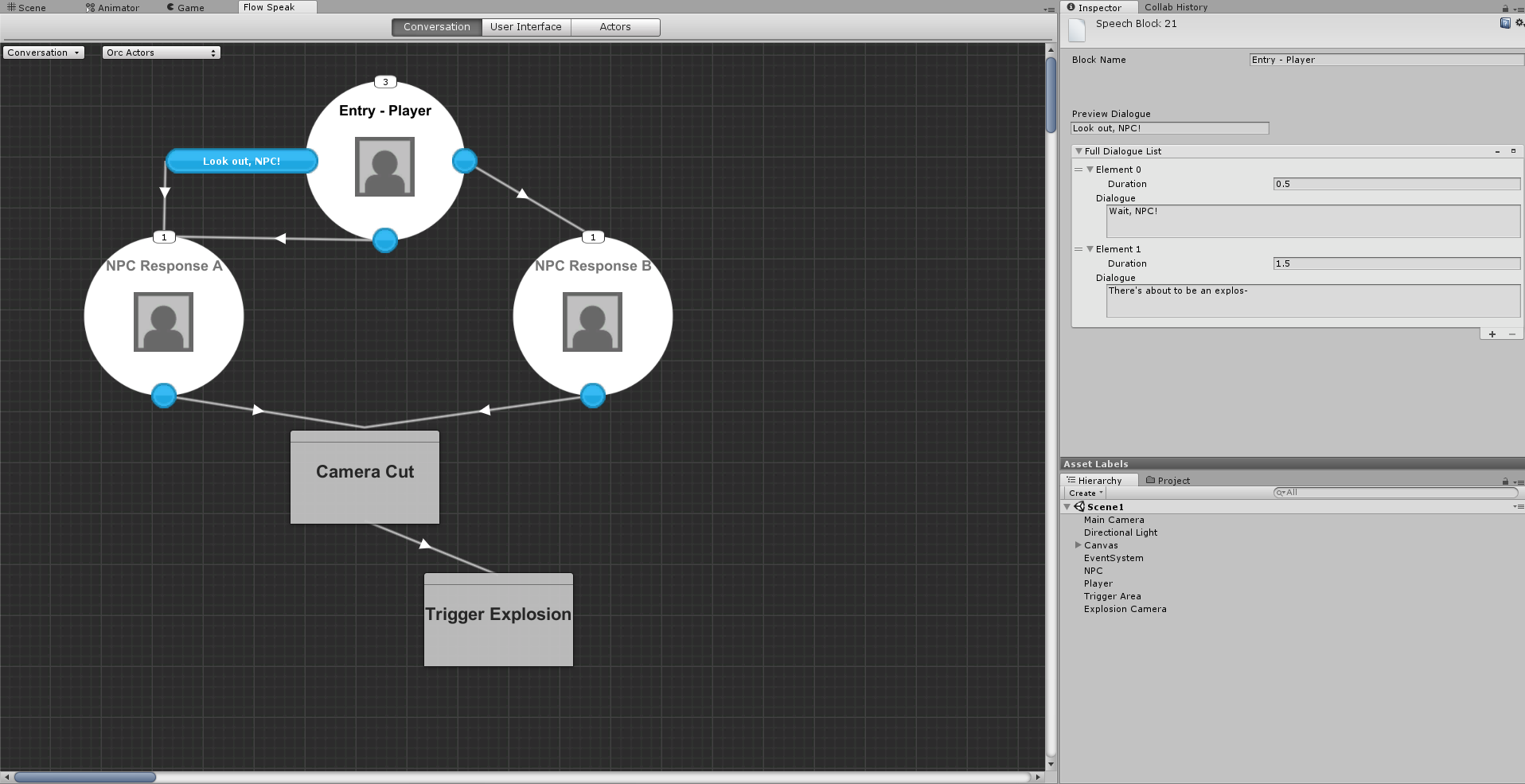
Conversations are comprised of two main things: 'Speech Blocks' and 'Action Blocks'. These blocks can be created and edited within Flow Speak's unique, visual editor. Each block is a node, which can be transitioned into the next block.
As shown in the image to the right, speech blocks are represented as large, white circles, action blocks as grey rectangles, and speech options as small, blue circles.
Speech Block
Speech Block Inspector
Each speech block can have any number of speech options. These speech options can branch to different dialogue responses.
As shown in the following image, users can set the option's 'preview dialogue'. The preview is what the player will see when choosing an option in-game.
The full dialogue is broken down into segments. Each segment is displayed separately, and can there own typewriting effects that override the default settings.
Users can change the actor that is assigned to that speech block. More info about actors is detailed below in the "Actor Database".
Non-player actors can also have multiple speech options. Currently weighted random probability is used to choose between different options. Conditional evaluations are a feature that is currently a work in-progress.
Action Block
Action Block Inspector
Users who need in-game sequences to happen during a conversation can use the action block. Simply create a new class that inherits OnTriggerAction() from the BaseAction class, and define your own behavior.
The right image shows an action that cuts from one camera to another. In it two camera fields are defined. In the inspector for the camera cut action block, users are able to set the cameras to conversation objects.
Conversation Inspector
Conversation objects are how a conversation is able to interact with scene game objects. In the case of the camera cut action, two different cameras from the scene are needed. As shown in the left image, clicking the 'Add Object' button opens a search menu that shows every type of built-in and user-defined component.
The final step is to then assign a scene object to each conversation object in the 'Flow Speak Actor' component. This can be found on every NPC game object, as seen in the image below.
Once the conversation field for the actor is assigned, the inspector will update itself to create component fields that mirror the conversation's objects.
Flow Speak Actor Inspector
Conversation Collection List
Conversation database
In order for this asset to be viable for any game project, it was imperative that managing conversations would be a process suited for both small and large scale projects. This feature is the main focus for the latest version of Flow Speak, and is still a work in-progress.
The database contains a list of "Conversation Collections". These collections dictate how conversations are grouped together, queued, and enabled/disabled in-game. The current features that are being implemented now include:
- Enabling/disabling entire collections or individual conversations via conditional evaluations or scripting.
- Looping through an ordered queue of conversations.
- Create and load persistent save files for collections or individual conversations.
User Interface Settings
UI canvas Integration
One of the goals of this asset is to make it easy and efficient for users to hook up the UI canvas elements with conversations. Currently a basic implementation is in place, which allows for:
- Interactive player speech options.
- Displaying full dialogue as segments.
- Option for automatically displaying the next segment of text after an amount of time.
- Option to require a button press in order to continue dialogue.
- Typewriter effect when displaying dialogue, with customizable delay times.
Actor Database Tab
Actor Databases
Actors represent the character participants in a conversation. They consist of a character portrait and unique sound effects that are presented during in-game dialogue.
Users can also define a list "sub-states" for each actor. These are meant to represent different emotional or active states for a character (e.g., angry, sad, happy).
The actors are then assigned to NPC game objects in the game scene. Conversations and sequences are then initiated through interacting with those characters.
In-Progress Features
- Conditional Evaluations
- Used for enabling and disabling speech options, individual conversations, and entire conversation collections.
- Improved Editor GUI
- An ongoing process of updating the GUI to be more accessible and appealing.
- Currently the conversation editor's speech blocks are being redesigned to be less obtrusive and more accessible for writers.
- Conversation Database
- The highest priority feature currently. For more details, refer to the "Conversation Database" section above.
Planned Features
- Fully Sequenced Action Blocks
- Tool for writers and designers to easily created complex action sequences through a visual editor.
- Dialogue Barks
- Non-interactive blurbs of short dialogue that are shouted by NPC's.
- Streamlined UI Canvas Integration
- Rework of the process for integrating UI canvas elements to be more intuitive.
- Ability to add custom UI canvas elements.
- Text Mesh Pro Integration
- Full integration of the Text Mesh Pro Unity asset, to allow for more dynamically displayed dialogue.